在上一篇博客Cocoa RunLoop 系列之基础知识介绍了RunLoop的InpuSource有两种,分别是:
- 是基于Mach端口且由内核触发的source1
- 自定义且需要手动触发的source0。
其中source0包括两种自定义形式:一种是Apple实现的自定义InputSource,提供了一系列接口,直接调用即可;另外一种就是由用户根据开发需要完全自定义实现。本文要介绍的就是后者。
自定义InputSource在实际开发过程的中,可用于在子线程实现周期性且长时间的任务,通过自定义InputSource控制任务的执行。
然而,实际开发中,大部分需要处理的InputSource都属于source1,少数需要自定义InputSource的情况也可以借助Apple的自定义InputSource函数接口来满足需求。因此,实际开发中几乎不需要用户配置自定义InputSource。既然如此,是否还有探索配置自定义InputSource的必要?我个人的答案是肯定的。通过配置自定InputSource可以窥探RunLoop的整个Routine的具体流程,而不是只停留在理论层面,有助于更深刻地理解RunLoop运行机制。
下面进入正文,结合理论和源代码阐述配置自定义InputSource的全过程。
理论概述
下图是Apple开发文档中介绍自定义InputSource运行流程图:
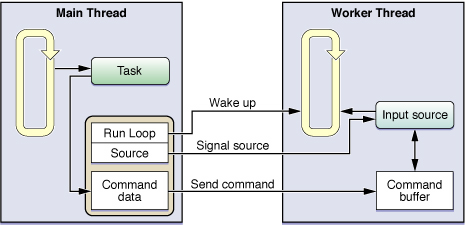
结合上图,总结一下几点:
- 在工作线程创建一个自定义InputSource并部署到RunLoop中
- 主线程中对线程的InputSource和RunLoop进行引用,用于后续操作
- 主线程与工作线程共享一个指令集合,以保证指令同步
- 通过主线程向InputSource中添加指令和数据
- 指令添加结束后,主线程发送一个通知给InputSource,随后唤醒工作线程中的RunLoop
- 工作线程的InputSource在接受到通知后,传送指令到RunLoop中等待处理
- RunLoop处理完成,进入休眠,等待下一次唤醒
代码实现
以上述理论为基础,结合Apple文档提供的代码片段,实现了一个配置自定义InputSource的Demo,完整实例可以查看GitHub源码。
IBRunLoopInputSource类用于管理和配置CFRunLoopSourceRef对象,以及包含一个指令集合。
以下是初始化函数:
1
2
3
4
5
6
7
8
9
10
11
12
13
14
15
16
17
18
19
20
21
22
23
24
25
26
27
28
29
30
31
32
33
34
35
36
37
|
@interface IBRunLoopInputSource ()
{
CFRunLoopSourceRef _runLoopSource;
NSInteger _currCommand;
}
@property (nonatomic , strong) NSMutableDictionary * commandInfo;
@end
@implementation IBRunLoopInputSource
#pragma mark - Init
- (id)init
{
self = [super self];
if (self) {
CFRunLoopSourceContext context = {0, (__bridge void *)(self), NULL, NULL, NULL, NULL, NULL,
&RunLoopSourceScheduleRoutine,
&RunLoopSourceCancelRoutine,
&RunLoopSourcePerformRoutine};
_runLoopSource = CFRunLoopSourceCreate(NULL, 0, &context);
}
return self;
}
|
上述代码中可看的一共有8个与InputSource相关的回调函数,此处只配置了3个,分别是RunLoopSourceScheduleRoutine、RunLoopSourceCancelRoutine和RunLoopSourcePerformRoutine。这3个回调函数的实现会在后面进行介绍。
对InputSource的基本操作:
1
2
3
4
5
6
7
8
9
10
11
12
13
14
15
|
- (void)addToCurrentRunLoop
{
CFRunLoopRef runLoop = CFRunLoopGetCurrent();
CFRunLoopAddSource(runLoop, _runLoopSource, kCFRunLoopDefaultMode);
}
- (void)invalidateFromRunLoop:(CFRunLoopRef )runLoop
{
CFRunLoopRemoveSource(runLoop, _runLoopSource, kCFRunLoopDefaultMode);
}
|
对指令集合的基本操作:
1
2
3
4
5
6
7
8
9
10
11
12
13
14
15
16
17
18
19
20
21
22
|
- (void)addCommand:(NSInteger)command withData:(id)data
{
if (data)
{
[self.commandInfo setObject:data forKey:@(command)];
}
}
- (void)fireCommand:(NSInteger)command onRunLoop:(CFRunLoopRef)runloop
{
_currCommand = command;
CFRunLoopSourceSignal(_runLoopSource);
CFRunLoopWakeUp(runloop);
}
|
从上面的代码可看的,正如之前理论概述总讲的顺序:发出指令之后,先通知InputSource,再唤醒其所在的RunLoop。
指令通过RunLoop循环,触发相关的回调函数,最终派发给IBRunLoopInputSource对象,然后再处理。
1
2
3
4
5
6
7
8
9
10
11
12
13
14
15
16
17
18
|
- (void)performSourceCommands
{
id data = [self.commandInfo objectForKey:@(_currCommand)];
if (!data) {
data = [NSString stringWithFormat:@"Empty data for command : %ld" , _currCommand ];
}
if (self.delegate && [self.delegate respondsToSelector:@selector(inputSourceForTest:)]) {
[self.delegate inputSourceForTest:data];
}
}
|
在这里,也许有同学感到困惑:为什么绕了一大圈,最终指令执行的代码还是由IBRunLoopInputSource对象来处理,不如直接把指令处理的函数接口公开,直接调用好了?我之前也有类似的困惑,后面仔细一想才想通。可以从两个角度来解答这个困惑:
- 自定义InputSource的一个主要目的在于在子线程中进行周期性的任务
- 假设在主线程中直接调用,那么执行的代码也是在主线程,背离了初衷。而通过子线程的RunLoop派发之后,指令对应的处理执行是在子线程
- RunLoop的智能休眠配合自定义InputSource能将子线程长时间执行的情况下的资源开销降到最低
上述3点恰恰的自定义InputSource的精华所在。
创建并配置InputSourceContext对象
IBRunLoopContext类是一个容器类,用于管理InputSource与RunLoop之间的关系。Demo中的代码实现的最简单的一对一的关系,也可以实现一对多的关系,即一个InputSource关联多个RunLoop。
初始化如下:
1
2
3
4
5
6
7
8
9
10
11
12
13
14
|
- (id)initWithSource:(IBRunLoopInputSource *)runLoopSource andLoop:(CFRunLoopRef )runLoop
{
self = [super init];
if (self)
{
_runLoopInputSource = runLoopSource;
_runLoop = runLoop;
}
return self;
}
|
当InputSource加入RunLoop中之后,会触发相关的回调函数。在前文中提到,在创建InputSource的时候Demo中配置了3个与InputSource相关的回调函数,具体实现如下:
1
2
3
4
5
6
7
8
9
10
11
12
13
14
15
16
17
18
19
20
21
22
23
24
25
26
27
28
29
30
31
32
33
34
35
|
void RunLoopSourceScheduleRoutine (void *info, CFRunLoopRef rl, CFStringRef mode)
{
IBRunLoopInputSource* inputSource = (__bridge IBRunLoopInputSource*)info;
IBRunLoopContext * theContext = [[IBRunLoopContext alloc] initWithSource:inputSource andLoop:rl];
[(AppDelegate *)[NSApp delegate] performSelectorOnMainThread:@selector(registerSource:)
withObject:theContext waitUntilDone:NO];
inputSource.context = theContext;
}
void RunLoopSourcePerformRoutine (void *info)
{
IBRunLoopInputSource* inputSource = (__bridge IBRunLoopInputSource*)info;
[inputSource performSourceCommands];
}
void RunLoopSourceCancelRoutine (void *info, CFRunLoopRef rl, CFStringRef mode)
{
IBRunLoopInputSource* inputSource = (__bridge IBRunLoopInputSource*)info;
if (inputSource.context)
{
[(AppDelegate *)[NSApp delegate] performSelectorOnMainThread:@selector(removeSource:)
withObject:inputSource.context waitUntilDone:YES];
}
}
|
上述代码分别是InputSource部署、执行和移除相关的回调函数:
- 部署:在InputSource部署到RunLoop之后,触发回调函数RunLoopSourceScheduleRoutine,将inputSource对象和RunLoop打包成一个context,通过Apple实现的自定义InputSource函数,发送给主线程,用于发送指令
- 执行:执行对应的指令
- 移除:在主线程中的context引用
创建并配置工作线程
IBRunLoopInputSourceThread类用于配置RunLoop和InputSource。
线程入口函数实现如下:
1
2
3
4
5
6
7
8
9
10
11
12
13
14
15
16
17
18
19
20
21
22
23
24
25
|
- (void)main
{
@autoreleasepool {
self.inputSource = [[IBRunLoopInputSource alloc] init];
[self.inputSource setDelegate:self];
[self.inputSource addToCurrentRunLoop];
[self configureRunLoopObserver];
while (!self.cancelled) {
[self doOtherTask];
[[NSRunLoop currentRunLoop] runMode:NSDefaultRunLoopMode beforeDate:[NSDate distantFuture]];
}
}
}
|
在子线程中的入口函数中,创建InputSource并加入RunLoop,随后启动RunLoop。这里一定要在while循环中切换RunLoop,否则RunLoop只会执行一次便退出。原因在于[[NSRunLoop currentRunLoop] runMode:NSDefaultRunLoopMode beforeDate:[NSDate distantFuture]]函数只会执行一次RunLoop,如果InputSource未添加或者已处理完或者超时会立即退出RunLoop。
完善主线程配置
主线程的配置在AppDelegate类中实现,包括创建工作线程、管理InputSource引用以及添加指令和发送通知。
管理InputSource引用:
1
2
3
4
5
6
7
8
9
10
11
12
13
14
15
16
17
18
19
20
21
22
|
- (void)registerSource:(IBRunLoopContext*)sourceInfo
{
[self.sourcesToPing addObject:sourceInfo];
}
- (void)removeSource:(IBRunLoopContext*)sourceInfo
{
[self.sourcesToPing enumerateObjectsUsingBlock:^(id obj, NSUInteger idx, BOOL *stop) {
if ([obj isEqual:sourceInfo])
{
[self.sourcesToPing removeObject:obj];
*stop = YES;
}
}];
}
|
添加指令和发送通知
1
2
3
4
5
6
7
8
9
10
11
12
13
14
15
16
17
18
|
- (void)addCommand:(NSInteger)command withData:(id)data
{
NSAssert([self.sourcesToPing count] != 0, @"Empty Input Source...");
if (self.sourcesToPing.count > 0) {
IBRunLoopContext *runLoopContext = [self.sourcesToPing objectAtIndex:0];
IBRunLoopInputSource *inputSource = runLoopContext.runLoopInputSource;
[inputSource addCommand:command withData:data];
[inputSource fireCommand:command onRunLoop:runLoopContext.runLoop];
}
}
|
总结
在写上一篇博客的时候,对与配置自定义InputSource还尚不了解。利用碎片时间和工作间隙仔细阅读了Apple开发文档的相关资料,并且在网上查阅了同行的一些博客之后,决定自己动手写了一个Demo。写Demo的过程的遇到一些新的困惑,随着Demo的完成,大部分困惑也随之而解。